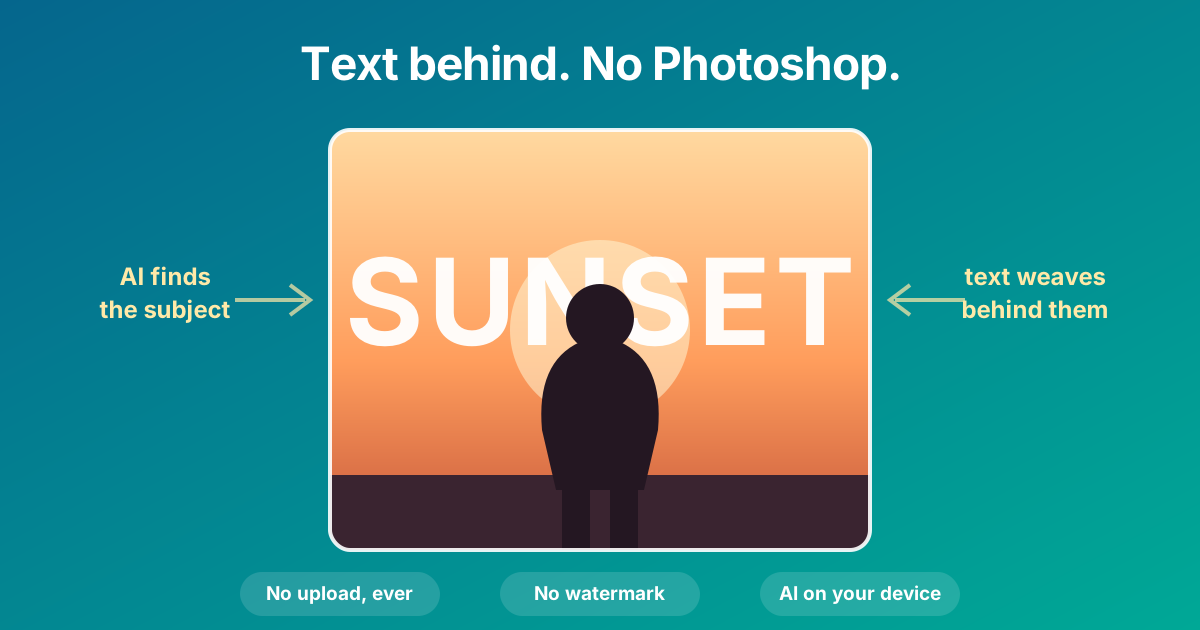
A huge word sitting behind a person, letters tucking behind a shoulder, the top of a head overlapping the type. You have seen it on album covers, sports graphics, phone wallpapers, and half of your Instagram feed. The Text Behind Image Maker at The Dollar Web automates the whole trick, free, in your browser, without your photo going anywhere.
Why this effect looks so good
The trick works because it manufactures depth. The moment part of a letter disappears behind a person, your brain reads the text as existing inside the scene rather than pasted on top of it. That single overlap turns a snapshot with a caption into something that looks like an editorial layout or a movie poster.
Designers have known this forever. Magazine covers have been threading the masthead behind the cover star's head for decades; that is why the effect reads as instantly professional. What changed is who can produce it.
How it used to be done, and what changed
The manual version requires Photoshop or something like it: select the subject (the hard part), duplicate it to its own layer, place your text between the background and the subject copy, then clean up the mask edges around hair and shoulders. Doable, but it is a real skill with a real learning curve, attached to a real subscription.
The step that made this hard, cutting the subject out cleanly, is exactly what AI segmentation models are good at now. The same kind of model that powers our Background Remover predicts which pixels belong to the subject, and once you have that mask, the layer sandwich assembles itself: background, then your text, then the cutout subject on top.
The manual Photoshop route
- Subscription software
- Subject selection and layer masking by hand
- Edge cleanup around hair and shoulders
- Re-doing the mask if you change photos
- Real skill, real time per image
The Text Behind Image Maker
- Free, in your browser, no account
- AI finds the subject in a few seconds
- Soft mask edges handled automatically
- Text edits re-render instantly
- Your photo never leaves your device
And unlike the web apps that copied this trend, nothing is uploaded. The segmentation model comes to your browser (about 4 MB, once) and runs on your own hardware, the same architecture we described in our post on client-side processing.
How to make one, step by step
Open the Text Behind Image Maker. If you want to feel the effect before digging out a photo, click "Try a sample image" and play with the built-in sunset silhouette.
- Drop in a photo (JPG, PNG, or WebP), or paste one from your clipboard. Photos with one clear subject work best: a person, a pet, a product, a building against sky.
- Let the AI find the subject. The first visit downloads the model (about 4 MB, cached after that); the detection itself takes a few seconds. If the photo has no clear subject, the tool says so honestly instead of pretending.
- Type your text. A big default headline appears already positioned to peek out from behind the subject. Replace it with your word: a name, a place, a year, a mood.
- Drag it into place. The overlap is the whole effect, so position the text where the subject covers part of it. Head-and-shoulders height usually reads best.
- Style it. Eight fonts, weight, size up to nearly half the image height, color swatches, opacity, rotation, letter spacing, and a soft shadow for extra depth. Add more text layers if the design calls for it; click any of them on the preview to select and edit.
- Download. PNG or JPG at full working resolution, no watermark. On phones, "Save to Photos" drops the design straight into your camera roll, wallpaper-ready.
The design habits that make it look professional
Go bigger than feels comfortable
The number one amateur tell is timid type. The effect sells at sizes that feel too large when you first drag the slider: the word should be a design element on par with the subject, not a caption. Editorial covers set the masthead enormous for a reason.
Overlap, but do not bury
If the subject hides most of the word, it stops reading as text. If nothing overlaps, it is just a caption. The sweet spot leaves the word clearly legible with one satisfying bite taken out of it by a head or shoulder.
Let the photo pick the color
White works on almost everything. Beyond that, pull a color that already exists in the photo (the sky, a jacket, a neon sign) so the type feels native to the scene. Dropping the opacity a touch, to 85 or 90 percent, settles the text into the image.
One word beats a sentence
The trend runs on single words and short names: a city, a year, a mood, a team. If you need a longer message on an image, that is a different job, and our Quote Card Generator is built for it.
What is happening under the hood
The subject detection is a salient-object segmentation network, U²-Net small, the same model behind our Background Remover. It looks at your photo and predicts, pixel by pixel, what the main subject is. That prediction becomes an alpha mask: the tool draws your original photo, draws your text on top of it, then draws the masked subject cutout on top of the text. Three layers, one canvas, and the illusion is complete.
The mask is computed once per photo, which is why every text edit afterward re-renders instantly. And because the model runs through WebAssembly inside the page, the whole thing works with your Wi-Fi off once the page has loaded. There is no server rendering queue, no watermark to buy off, and no copy of your photo anywhere but your device.
Where people use it
- Phone wallpapers: a name, a date, or a word behind a favorite photo is the classic use, and Save to Photos makes it a 30-second job.
- Social posts and reel covers: the effect stops the scroll because it looks designed rather than captioned.
- YouTube thumbnails: the title word behind the presenter's head is half the thumbnails on your homepage.
- Posters and events: the artist behind the headline, the venue behind the date.
- Sports edits: the season year or the number tucked behind the player.
- Product shots: the brand name behind the product gives a catalog photo an ad-campaign look.
The photos, and the privacy, worth caring about
The photos people run through this are personal by definition: kids, partners, pets, themselves. That is exactly the category of image that should not be bouncing through an unknown company's servers to get a design effect applied. Here the model comes to your browser and your photo goes nowhere, which is the same promise every tool on this site makes, and it is the architecture rather than a policy.
Try the Text Behind Image Maker
Drop in a photo, type a word, drag it behind your subject. No upload, no watermark, no sign-up.
Open the Text Behind Image Maker Browse All Image ToolsCommon questions
What app puts text behind a picture for free?
You do not need an app. The Dollar Web's Text Behind Image Maker runs in any browser: drop in a photo, an AI model finds the subject, and your text renders behind them. It is free, has no watermark, and never uploads your photo. On phones, Save to Photos puts the finished design straight in your camera roll.
Do I need Photoshop to put text behind a subject?
Not anymore. In Photoshop the effect takes a subject selection, a layer mask, and careful ordering of layers. An AI segmentation model now does the selection automatically, and the tool assembles the layer sandwich for you: background, then text, then the cutout subject on top.
Is my photo uploaded when the AI finds the subject?
No. The segmentation model downloads to your browser once (about 4 MB) and the detection runs on your own device. Your photo never travels anywhere, and the tool keeps working offline once the page has loaded.
Why does my text not go behind the subject?
Two common causes: the text is not overlapping the subject yet (drag it so the subject covers part of it), or the photo has no clear subject for the AI to lock onto. Photos with one prominent person, pet, product, or building against a distinct background segment best; a tighter crop around the subject also helps.
What is the text-behind-image effect used for?
Phone wallpapers with a name or date behind a favorite photo, Instagram posts and reel covers, YouTube thumbnails, posters with the headline behind the subject, sports edits with the season year behind the player, and product shots with the brand name tucked behind the product.